For awhile now I have been seeing a reoccurring charge for $5.99 listed as AMZN Digital*MI or something similar. I looked all over my account pages and could never find any subscriptions that were active. I was finally able to determine that the charge was for ComiXology which was squired by Amazon some time ago. I am assuming at some point the charge stopped being listed under ComiXology and was switched to Amazon Digital but I am not certain about this. There was no help for this online so I thought I would put a not here and hope that future searchers find this post.
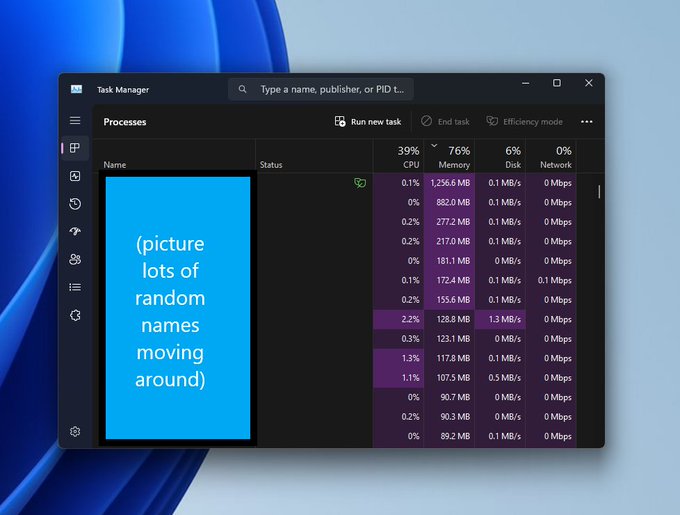
I can’t believe I’ve been struggling with apps in the Task Manager randomly moving around without realizing there’s a simple keyboard shortcut to pause the Task Manager and stop its contents in their tracks. Yup, all you have to do is hold down the CTRL key and it will pause the Task Manager on both Windows 10 and Windows 11, and perhaps even older versions of Windows, too.
This tip only applies to Windows 10 and 11 and I wish I had known this years ago! At any rate as you can see in the original article at your leisure and I hope it helps out others out there in this wide world.
---------- On Red Hat Linux ----------
$ cat /etc/redhat-release

---------- On CentOS Linux ----------
$ cat /etc/centos-release

---------- On Fedora Linux ----------
$ cat /etc/fedora-release

---------- On Debian Linux ----------
$ cat /etc/debian_version

---------- On Ubuntu and Linux Mint ----------
$ cat /etc/lsb-release

---------- On Gentoo Linux ----------
$ cat /etc/gentoo-release

---------- On SuSE Linux ----------
$ cat /etc/SuSE-release
AS you can see this various depending on on which form of the original Linux Operating System so I usually end up searching for this as it is not something that I use day to day in my professional or work life. I hope it makes somees’s day that much easier. 🙂
This is a really weird edge case that I came across at work. After an update to Windows subsystem for Linux (WSL) I was no longer able to use my Cisco AnyConnect VPN connection to connect to any of the infrastructure I manage.
WSL (112) ERROR: CreateProcessParseCommon:782: Failed to translate
Currently, the only method that I have to use a WSL Virtual Machine (VM) is to use this great third party script so that my VM knows how to actually use a network. I do with Microsoft had an easier way to do this, WSL has no network connectivity once connected to a VPN. 🤦🏻♂️
At any rate, all of these weird tech issues aside with how I choose to SSH into the systems I manage at work, this is how you correct the error WSL (112) ERROR: CreateProcessParseCommon:782: Failed to translate when attempting to use a WSL VM on a VPN Connection. You will need to edit the .profile folder in your home directory (/home/your_userneame_here) and add the following line to the end of the file.
wsl.exe -d wsl-vpnkit --cd /app service wsl-vpnkit start
To apply the fix, power cycle your WSL VM with your method of choice. I hope this helps and same you time having to search all over the Internet or watch a Youtube “tutorial” what wastes your time. If you have any questions, etc. hit me up via one of the methods on my contact page. Thanks for stopping by! 🙂
A Christmas orniment hanging on a Christmas Tree with Happy Holidays written in front of it.
I just wanted to wish everyone out there in this increasing crazy world out there. I have not felt much like celebrating the holidays since I lost my Wife three years ago but this years has me feeling much more into the spirit of things. With that being said I hope that you and yours have the happiest of holidays! 😀
This month my home experienced a rare power outage. It did not last very long but somehow during the outage my trusty ASUS router was powering up but it was not passing any traffic. I tried various troubleshooting methods but nothing resurrected it. So, now I am forced to use the WiFi function of my DSL Gateway. This system is really great for range but terrible for speed and reliability, My household suffers through this for a few days before we decided that now we are in the market for a new router so after doing some research at The Wirecutter to see what they recommend as they have a really good testing methodologies.
The clear winner was of course the Eero Mesh WiFi System. So my Wife and I made a trip to our local Best Buy to pick up the system that works best for the layout of our ranch style home. Before installing the new system I ran a few speed tests from my office on a desktop and in carious places through the house on my smart phone. The results are as follows.
Speed tests from DSL Gateway.
Mobil test from the kitchen.
Mobile test from the living room.
Mobile test from the bedroom.
Mobile test from the office.
As you can see the signal strength is good but the speeds are terrible. We were fin unless someone wanted to stream a video and we were buffering very often.
The setup process.
Setting up the Eero Gateway was very easy. Unbox the gatewayy, install the eero application from your mobile app store of choice, and follow the prompts.
For my home I have the following setup.
1x Eero Gateway in the Living Room
1x Belkin undamaged switch
1x Eero Beacon in the Kitchen
1x Eero Beacon in the Master Bedroom
Once everything synced up and the app advised me everything was connected it did a quick firmware update and restarted all 3 devices. Once they were all showing back online I ran the same speed tests again.
Speed tests from the Eero Gateway
Mobile test from the Kitchen.
Mobile test from the Living Room.
Mobile test from the Bedroom.
Mobile test from the Office.
I find the results pretty compelling and my household is much happier now. This is not the cheapest router out there but it is a huge improvement over anything I have used in a long time. Additionally, this router will never need me to manually upload to
Shortly after LEGO released a $349, 3,599-piece scale model of the Chiron LEGO has upped their game with a fully life sized and drivable model created out of Lego Technic pieces.
The Chiron uses 339 different Technic elements, many of which are used as load-bearing components. It even has working headlights—featuring the first use of some new types of transparent Techic bricks. The car weighs 3,306lbs (1,500kg), and even the powertrain is made from Lego: 2,304 of the little electric motors to be precise.
This seems like an insanely complex undertaking and I am trilled that the folks over at LEGO were able to pull this off! If you were wondering if the LEGO model was able to reach the speeds of the actual Chiron I’m sorry to say that it cannot. 🙁
This gives the Chiron somewhat reduced performance compared to the ones Bugatti makes in Molsheim, France. One of those has 1,500hp (1119kW) and a top speed in excess of 261mph (420km/h); the LEGO Technic Bugatti makes just 5.3hp (3.9kW) and tops out at 12.4mph (20km/h).